Subscriptions ≠ Ownership: Build an AI Capability You Control (and That Pays Back Fast)
TL;DR: Renting apps and tools gives you access. Owning the process and the data gives you control, portability, and compounding ROI. If you want to plan and scale operations—without piling on headcount—stop stacking subscriptions and start operationalizing the work.
What “ownership” actually means
Owning AI isn’t about training your own model. It’s about owning the work:
- Process: Your SOPs, checks, and approvals are encoded in a workflow you control.
- Data: Clean inputs/outputs land in systems you own (CRM/ERP/Drive), not trapped in a vendor’s UI.
- Artifacts: Prompts, templates, and rules live in your library—portable across tools.
- Integrations: Webhooks/APIs you control; components are swappable.
- Audit: Guardrails, logs, and change control so managers can trust the output.
Rent vs. Own (non-negotiables)
| Dimension | Subscription (“rent”) | Owned capability (“control”) |
| Workflow | App dictates steps | Your SOPs drive the flow |
| Data custody | Export… maybe | Records/events in your system of record |
| Prompts & templates | Buried in vendor UI | Versioned library you can move |
| Integrations | Vendor roadmap | Your webhooks/APIs |
| Auditability | Basic logs | Guardrails + approvals + trails |
| Switching cost | High | Lower (process + artifacts portable) |
Own the process and the data, and any single app becomes replaceable.
What subscriptions really cost SMBs (and why that’s not “ownership”)
A typical AI-friendly 8-person business often lands around $900–$1,800/month across apps and tools. One illustrative mix:
- Payroll/HRIS: ~$88/mo
- CRM (8 seats @ ~$30): ~$240/mo
- Email/marketing: ~$100/mo
- Scheduling: ~$12/mo
- Project management (8 @ ~$12): ~$96/mo
- E-sign (3 @ ~$20): ~$60/mo
- VoIP (8 @ ~$25): ~$200/mo
- Help desk (4 @ ~$20): ~$80/mo
- AI seats (8 @ ~$30): ~$240/mo
Ballpark total ≈ $1,116/mo → ~$13,392/yr.
And with typical 8–12% annual price creep, you’ll spend ~25% more in three years—yet still won’t own the process or the data model tying it all together.
Subscriptions are doors. ROI comes from the hallway you build behind them.
Who an AI Audit is for (planning & scale)
Leaders who want to scale without chaos and make sober investments—not gadget buys:
- Increase capacity without matching headcount
- Cut cycle time (lead → quote → invoice; intake → schedule → deliver)
- Reduce re-work and handoffs between apps and tools
- Standardize approvals & policy with an audit trail
- Consolidate spend while owning process and data
- Model ROI before committing to anything big or bespoke
Think traditional operations wisdom, modernized: map the work, control the data, keep vendors swappable.
What you get from an AI Audit (deliverables)
- Process map & bottleneck analysis (one value stream to start)
- Data inventory & integration plan (what lives where; what moves where; APIs/webhooks)
- Guardrails & SOPs (templates, prompts, approvals, audit logs)
- KPI & SLA design (cycle time, show/close rates, error rates, AR days)
- Cost & ROI model (baseline vs. future state; payback windows)
- 90-day implementation plan (quick wins → integrations → automations with controls)
Internal link: see our plain-English AI Audit overview.
Benefits by department (owned—not just “subscribed”)
| Function | Use cases | What actually changes | KPIs that move |
| Sales | Lead enrichment; tailored follow-ups; proposal/quote drafting; nudges | Same-day first touch; proposals from templates; no re-keying | CTR to calendar; show rate; win rate; cycle time |
| Marketing | Intake; content briefs; campaign tagging; attribution | Cleaner handoff to sales; consistent briefs | MQL→SQL rate; cost/lead; attribution clarity |
| Finance | Quote→contract→invoice; payment links; collections nudges; reconciliations | Invoices triggered by events; cleaner AR | AR days; error rate; time to cash |
| HR | Hiring intake; screening prompts; onboarding; policy acks | Faster screening; standardized onboarding | Time-to-hire; ramp time; completion rate |
| Admin/Ops | Scheduling with verification; approvals; reminders; dashboards | Fewer no-shows; fewer ad-hoc emails; one source of truth | No-show rate; SLA on-time %; touches per task |
Real-life example: A home-services firm stopped copying quote details into three systems. One flow now drafts the proposal, routes for approval, sends e-sign, and creates the invoice. Time and AR days dropped; close rate rose.
The booking calendar most SMBs rent vs. how we run it
Most businesses rent a scheduler for $8–$20/mo. It’s fine—but your process (verification, reminders, CRM logging) and your data (no-show patterns, source attribution) often get trapped in that app.
At Ames & Associates, the evening scheduler we deploy is an owned capability:
- Embedded on your domain (fast, branded, trustworthy)
- Email verification to cut no-shows
- Automatic admin + visitor emails
- “Booked” logic and blackout controls for last-minute changes
- Every request recorded in WordPress (auditable history)
- Hooks for your CRM, dashboards, and follow-ups
Same calendar experience. Different outcome because the workflow and data are yours.
(Yes, the calendar itself is a small subscription—but the outcome is owned.)
ROI you can bank (calendar → consult → close)
Let’s show money, not vibes. Conservative monthly example:
Baseline funnel
- Visitors: 1,000
- Click-through to “Book”: 3% → 30 clicks
- Calendar completion: 30% → 9 bookings
- Show rate: 80% → 7.2 shows
- Close rate: 40% → 2.88 deals
- Avg project: $3,500; GM% 55%
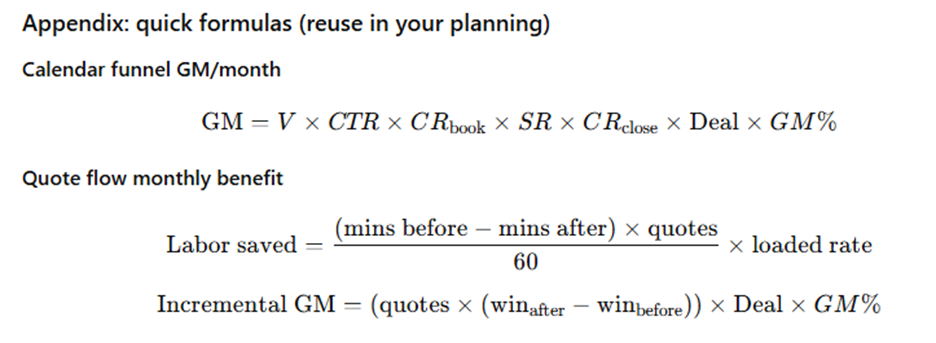
Gross margin (baseline) = 2.88 × $3,500 × 55% = $5,544
With owned capability
- Better placement/trust → CTR 4.5% → 45 clicks
- Frictionless widget → completion 40% → 18 bookings
- Email verification → show 90% → 16.2 shows
- Pre-qual + follow-ups → close 45% → 7.29 deals
Gross margin (owned) = 7.29 × $3,500 × 55% = $14,033
Incremental GM/month ≈ $8,489.Run cost (the scheduler): $8–$20/mo—noise compared to the lift when you own the process and the data.
Quote-flow ROI (time and money)
From a typical service firm scenario we’ve implemented:
- Quote draft time: 45 → 12 minutes (−73%)
- Quotes/month: 40
- Loaded labor rate: $45/hr
- Win rate: 25% → 32% (+7 pts)
- Avg deal: $3,500; GM% 55%
Monthly impact
- Labor saved: (45−12) × 40 ÷ 60 × $45 = $990
- Extra wins: 40 × (0.32−0.25) = 2.8 deals
- Incremental GM: 2.8 × $3,500 × 55% = $5,390
Total monthly benefit ≈ $6,380.
Payback is typically 1–2 months because we own the quote process (templates, policy checks, approvals, e-sign + invoice triggers) and the data (every event lands in CRM + dashboards). Swap tools later? The process still runs.
Where the Audit fits in a 90-day plan
- Days 1–30 — Map & quick wins
Pick one value stream (lead → quote → invoice). Ship 1–2 automations with guardrails. Baseline the KPIs. - Days 31–60 — Integrate the stack
CRM ↔ email ↔ e-sign ↔ accounting; add verification, approvals, alerts, and a simple dashboard. - Days 61–90 — Scale & standardize
Remove re-keying; graduate low-risk steps to auto-approve; publish SOPs; review ROI; queue the next process.
Budget tiers (start small, compound wins)
- <$3k — Booking + verification + auto-emails; smart intake; FAQ assistant
- $3k–$8k — Quote→contract→invoice with e-sign + payments; KPI board
- $8k–$15k — Full service pipeline (intake, SLA alerts, billing triggers) + role-based dashboards
SLA (Service Level Agreement) = the time/quality targets your team agrees to hit (e.g., first response in 15 minutes, quotes in 1 business day). We wire the timers, nudges, and escalations so you hit them.
Ready to own the outcome—not just rent the app?
Our evening calendar is the perfect example: most firms rent access; we deploy it as an owned capability tied into your stack and metrics.
Book a complimentary 30-minute (evenings) meeting:
👉 Schedule your consult
Questions or want a quick review of your current tool stack? Reply with your top 3 bottlenecks—we’ll estimate the ROI of “owning the hallway behind your doors.”